
Rushly: Meet & Date
NICE DAY TECHNOLOGY LIMITEDSocial
4.61.62K Reviews
- Version
- 1.2.7
- Installs
- 100.00K
- Age Rating
- Mature 17+
Screenshots

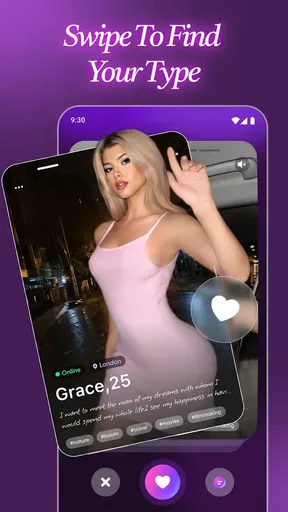

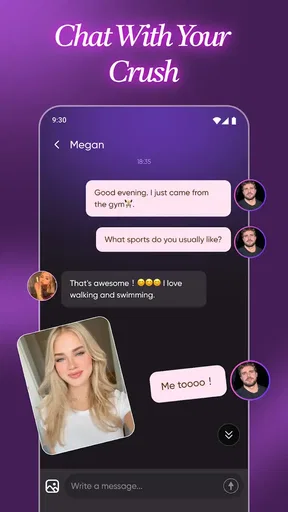
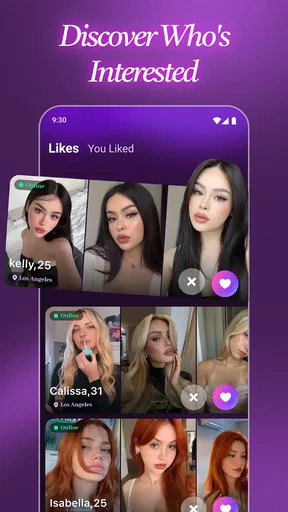


Our Review of Rushly: Meet & Date
 Analysis by Appyee
I approached Rushly: Meet & Date as a social app for people who want to meet someone new without treating every interaction like a formal dating project. Its basic promise is simple: connect for dating or friendship, then decide where the conversation goes. That sounds familiar, but the useful question is whether the experience feels quick enough for casual browsing, dependable enough for regular conversations, and comfortable for people who do not want to spend hours managing a profile.
After using it, my impression is that Rushly is best understood as a lightweight discovery space rather than a complete social life in an app. It can help you open a door to a conversation, but it cannot remove the uncertainty that comes with meeting strangers online. I liked the direct purpose, while also feeling that the mature audience and paid extras mean users should approach it with clear boundaries and a little patience.
How Rushly feels when you start browsing
The app comes from NICE DAY TECHNOLOGY LIMITED and sits in the social category. It is free to install, with optional purchases ranging from $3.99 to $99.99 per item. That combination makes the first step easy, but it also means I would not treat every visible opportunity as something worth paying for. The free experience is the right place to decide whether the people, pace, and conversation style suit you before spending anything.
Rushly is aimed at a mature audience, with a 17+ content rating. That matters beyond the label. Someone joining should be prepared for conversations that may be more personal or direct than those found on a general-purpose friendship network. I would recommend setting expectations early: say whether you are interested in dating, friendship, or simply getting to know people, and do not let the app’s social atmosphere pressure you into sharing more than you want.
The app’s published summary describes its purpose as dating and making friends, while its short store label is simply “Rushly.” In practice, that broad positioning is both its appeal and its challenge. You are not locked into one narrow type of connection, but you may need to do more work yourself to understand what another person wants. I found that the best conversations came from being specific rather than relying on a vague opening line.
One useful habit is to treat the first session as an orientation rather than a hunt for an instant match. Look at how profiles present themselves, notice whether the tone feels respectful, and decide whether the available social mix is right for you. This small pause prevents a common mistake: judging a social app only by how quickly it produces attention.
Speed expectations in everyday use
Rushly’s appeal depends partly on low friction. A social app like this needs to let me move from opening it to making a useful decision without turning every action into a long process. My experience was most comfortable when I used short sessions: check the available people, respond to anything meaningful, and leave when I had nothing genuine to add.
I would not use it with the expectation that speed alone creates better results. Fast browsing can encourage shallow choices, especially when several profiles appear one after another. The app is more useful when I slow down for the few profiles that actually interest me. That is a trade-off worth remembering: quick discovery is convenient, but thoughtful conversation still takes time.
For a realistic weekday scenario, imagine finishing work and having ten minutes before dinner. Rushly can fit that window well if your goal is to see whether anyone is available for a friendly exchange. I would avoid opening it during a meeting, while commuting, or when distracted, because social decisions made in a hurry often lead to weak messages and unnecessary follow-up.
The perceived pace also depends on the quality of the people you encounter. If you are looking for a very specific relationship style, location, or community, the process may feel slower because you need to filter more carefully. A larger mainstream dating service may be better for someone who wants the broadest possible pool, while Rushly makes more sense for a person who values a simpler, less formal starting point.
A practical speed tip is to prepare two or three natural opening questions before browsing. I would keep them connected to something visible in a profile rather than using a copied greeting. This reduces the temptation to send messages too quickly and gives conversations a better chance of moving beyond a single reply.
What happens during heavier use
Light browsing is not the same as sustained use. The demanding moments are likely to come when several conversations are active, when you move repeatedly between discovery and messaging, or when you spend a long session reviewing potential connections. In those situations, my advice is to manage your attention before worrying about the app itself. Too many open conversations can make the experience feel slow even when the interface is responding normally.
I found a simple routine more effective than trying to answer everyone immediately. I would keep the conversations with clear mutual interest, reply when I had something worthwhile to say, and step away from exchanges that felt repetitive or uncomfortable. This is an important, non-obvious strength of a social app with a focused purpose: it can be useful as a small daily habit, but it becomes tiring when treated like an endless feed.
Heavy use also exposes the difference between discovery and relationship building. Browsing gives you more possibilities, while messaging demands more emotional energy. If Rushly becomes part of your daily routine, set a personal stopping point. A short, intentional session is less likely to turn into compulsive checking, and it leaves you more capable of recognizing which conversations deserve attention.
On a phone with limited free storage or an older battery, I would avoid keeping any social app open unnecessarily. Close it after a session, keep the operating system reasonably current, and leave room for normal phone maintenance. I cannot promise that these steps will transform performance, but they are sensible ways to reduce the chance that a busy device makes the app feel worse than it is.
Another useful workflow is to separate “interesting” from “ready to meet.” A pleasant conversation is not automatically a reason to arrange an in-person meeting. I would move gradually, keep early plans public, tell a trusted person where I am going, and make sure I can leave independently. Rushly can support the first connection, but personal safety decisions remain mine.
Reliability, continuity, and recovering from interruptions
Reliability in a social app is not only about whether it opens. It is also about whether I can return to a conversation without losing the thread, whether a brief interruption ruins the session, and whether the app remains understandable when I come back later. My overall view is that Rushly works best when I use it in manageable bursts rather than expecting it to replace a dedicated messaging service.
Phone interruptions are normal: a call arrives, the battery runs low, or I switch to another app. When that happens, I prefer to pause instead of composing a rushed reply. If a conversation matters, I would reopen it later and answer with context. That approach is useful even when an app is functioning perfectly, because the biggest reliability problem in social communication is often an unclear or incomplete message rather than a technical failure.
For important conversations, I would avoid assuming that an online exchange is permanently available. Save only the information you genuinely need, remember the person’s name and the point you were discussing, and do not rely on a social app as your only record of plans. This is not a criticism unique to Rushly; it is a sensible habit whenever communication happens inside a platform.
The current version is 1.2.7, and the app runs on Android 6.0 or later. Those details make it accessible to people who are not using a brand-new phone, although compatibility alone does not guarantee an equally smooth experience on every device. Older hardware may handle modern social interfaces less comfortably, especially if the phone is already crowded with background activity.
If the app feels inconsistent, I would troubleshoot in a calm order: check the internet connection, close other demanding apps, restart Rushly, and then restart the phone if necessary. I would also make sure there is enough free storage for normal operation. These are ordinary steps, but they help distinguish an isolated device issue from a problem with the service itself.
Recovery is also social. If a message is interrupted or a conversation goes quiet, do not assume the other person is rejecting you. Online availability changes, and a delayed response is not automatically a sign of bad intent. At the same time, repeated silence is useful information; I would move on rather than repeatedly chasing an inactive connection.
Device limits and the cost of staying engaged
Because Rushly is free to start, it is easy to install it on a secondary or older phone and see how it fits into daily life. The minimum Android requirement of 6.0 gives it a broad technical reach, but I would still pay attention to battery condition, available storage, and the number of apps running at the same time. A phone that already struggles with ordinary multitasking may make any social app feel less responsive.
Resource demands are not something I would judge from the download decision alone. The real burden comes from how long you keep the app open, how often you refresh social content, and how frequently you return to conversations. My recommendation is to use it intentionally instead of leaving it active all day. That is better for battery habits and, more importantly, for your attention.
Users on smaller screens may also need more patience when reviewing profiles or writing messages. A compact display is fine for brief checks, but longer conversations are easier when you can read carefully and edit before sending. If you often make decisions while walking or multitasking, Rushly is not the right place to rush; wait until you can focus.
Data costs deserve a practical mention as well. Anyone using a limited mobile plan should browse over Wi-Fi when possible and avoid spending long periods refreshing content away from home. I would not install a social app specifically for use in weak-signal areas. If your routine involves unreliable connectivity, a service designed around dependable offline access would suit you better than a live meeting platform.
The purchase system is another device-and-budget consideration. Since the app is free but offers optional items from $3.99 to $99.99, I would decide in advance whether any paid feature is genuinely improving my experience. Never buy because a conversation feels urgent or because you worry that an opportunity will disappear. A free trial period in your own mind—using the app without spending—gives you a clearer sense of its value.
I would also avoid installing Rushly on a shared phone unless everyone using that device understands the privacy implications of a social account. Meeting and dating conversations are personal. Use a lock screen, keep your account details private, and be careful when notifications appear where other people can see them.
Who will get the most from Rushly?
I think the app suits adults who want a direct way to meet people but are open to friendship as well as dating. It is especially reasonable for someone who dislikes the pressure of choosing one rigid relationship category at sign-up. The broader purpose lets you begin with conversation and clarify intentions naturally.
It may also work for a person who prefers short, occasional check-ins rather than spending an entire evening on a dating service. The best workflow is simple: browse with a clear intention, start only a few conversations, and judge the quality of replies rather than counting how many profiles you viewed. That approach makes the app feel more human and less like a competition.
I would recommend skipping it if you want a highly specialized dating community, extensive relationship questionnaires, or a service built mainly around long-term compatibility analysis. Rushly’s appeal is its accessible social starting point, not a promise that an algorithm will make every important decision for you. Someone who wants a very structured matchmaking process may feel more comfortable with a conventional dating alternative.
It is also not ideal for anyone who is uncomfortable with mature conversations or who expects every contact to be verified, serious, and immediately available. The 17+ rating is a clear signal to approach the social environment as an adult space. Keep personal details limited, watch for pressure, and leave conversations that become manipulative, sexual in an unwanted way, or financially suspicious.
Compared with general social networks, Rushly has a clearer reason for being there: meeting and dating are central rather than accidental. Compared with large dating platforms, it feels less useful for people who want a deeply filtered search process or a very specific niche. Compared with ordinary messaging apps, it offers a way to discover new contacts, but it should not be treated as a replacement for trusted communication with people you already know.
My performance verdict after regular use
My final assessment is positive but measured. Rushly is appealing when I want a straightforward social doorway, quick sessions, and room for both friendship and dating. Its free entry makes experimentation easy, while the mature positioning tells me to use it with adult judgment rather than casual oversharing.
In terms of perceived speed, I would call it most comfortable for focused browsing and short conversations. During heavier use, the main challenge is managing attention and multiple exchanges, not simply pressing through more profiles. On an older or busy device, sensible maintenance—free storage, a healthy battery, and fewer background tasks—will matter as much as the app itself.
Its reliability is good enough for ordinary social use when I keep expectations realistic. I would not depend on it as the only place for important plans, and I would not interpret every delay as a technical failure or personal rejection. The strongest experience comes from using it as an introduction tool, then applying good communication and safety habits outside the screen.
The app has earned a 4.6 average from around 20 thousand ratings, with over 1 thousand written reviews and more than 100 thousand installs. Those figures suggest meaningful interest, but they do not replace my own test of whether the available conversations fit your goals. A strong rating can tell you that many people enjoy the product; it cannot tell you whether your local social experience will feel active.
My recommendation is to try Rushly without spending first, use it in short intentional sessions, and judge the quality of interaction rather than the volume of attention. If you want a flexible meeting-and-friendship app and are comfortable taking responsibility for boundaries, it is worth exploring. If you need specialized matching, guaranteed responsiveness, or a carefully structured dating system, another option will probably serve you better.
For me, the app’s real value is not that it makes meeting people effortless. It is that it lowers the barrier to starting a conversation while leaving room for users to decide what that conversation should become. That is a modest promise, but an honest one—and it is the reason I would recommend giving Rushly: Meet & Date a cautious, free try rather than treating it as an instant solution to dating or loneliness.
Verdict
Strengths of Rushly: Meet & Date
- Quick profile browsing makes discovering nearby matches feel effortless.
- The dating-focused design keeps conversations centered on meeting new people.
- Simple navigation is approachable for users who dislike complicated dating apps.
- Matching can help users find people with similar relationship interests.
- Useful for expanding your social circle beyond existing contacts.
Limitations of Rushly: Meet & Date
- The quality of matches may vary depending on activity in your local area.
- Some features may require payment or in-app purchases.
- Users should be cautious about profiles that seem incomplete or suspicious.
- Frequent notifications could become distracting without careful settings management.
- Privacy-conscious users may dislike sharing personal and location-related information.
Similar Picks in This Category
View All
Meta Platforms, Inc.4.6

Instagram4.0

Likee-Live, Chat & Party Games
Likeme Pte. Ltd.4.4

Facebook Lite
Meta Platforms, Inc.4.5

TikTok - Videos, Shop & LIVE
TikTok Pte. Ltd.4.0

Moj: Free Short Drama & Reels
ShareChat4.1
Frequently Asked Questions
What is Rushly: Meet & Date, and how does it work?
Rushly: Meet & Date is a social dating app designed to help people discover potential matches, start conversations, and arrange dates through a mobile interface. After creating a profile, you can usually add photos and personal information, review other users, and interact with profiles that interest you. Available features and matching options may vary depending on your location, account type, and app version.
Is Rushly: Meet & Date free to download and use?
The app may be available to download at no initial cost, but some functions can require in-app purchases or a paid subscription. Basic profile browsing or matching options may be included for free, while features such as unlimited messaging, enhanced visibility, advanced filters, or seeing additional interaction details could be restricted. Check the current pricing, renewal terms, and cancellation policy before subscribing.
Is Rushly: Meet & Date safe for meeting new people?
Rushly: Meet & Date may provide tools such as profile controls, reporting, or blocking to support a safer dating experience, but no dating platform can guarantee that every profile is genuine or trustworthy. Avoid sharing sensitive information, remain cautious about requests for money, and use the app’s reporting features when necessary. Arrange first meetings in public places and tell someone you trust about your plans.
What information is needed to create a profile on Rushly: Meet & Date?
Registration requirements can depend on the platform and the current version of the app, but users will generally need an account identifier such as an email address, phone number, or supported social login. You may also be asked to provide a name, age, location, photos, and preferences. Review the privacy policy and app permissions carefully, especially before allowing access to contacts, photos, camera, or location data.
Can I delete my Rushly: Meet & Date account and cancel a subscription?
Account deletion and subscription cancellation are usually handled separately. Removing the app from your phone may not cancel an active subscription, so recurring payments should be stopped through Google Play or the Apple App Store, depending on your device. Look in the app’s account settings for deletion instructions and confirm whether deleting your profile also removes matches, messages, and other stored information.
